Fast Prototyping with Hugging Face's Inference API
Build AI-based applications with Hugging Face in a few minutes.
August 4, 2024 · HuggingFace, Prototyping

Introduction
The boom in Large Language Models has brought many people, not just data scientists, closer to the world of AI. Everyone is using these models in their applications, and you certainly don’t have to be a Machine Learning expert to do so, you just need to invoke APIs served by pre-trained models and get their output! So let’s see how to create and use APIs that are useful for doing real-time inference on real data created by experts and that can be integrated into more complex applications.
LLMs are huge models that contain millions of parameters and have taken huge amounts of textual data (e.g., everything on the world wide web) and are able to process it and solve tasks. One of the most curious things about these models is that they generate emergent capabilities, on which they have never been trained. For example, they are able to solve small math or logic problems without having been specifically trained on them. Or they are able to interact with the user as in a chat room.
Many realities are only recently approaching the world of AI and want to use Machine Learning capabilities to create products or offer new services. Often to create a valuable AI-based product, the speed with which you can launch it into the market is critical. So in this article, I want to talk about how to use Hugging Face for fast prototyping.
Hugging Face
Hugging Face (HF) was established as a leading platform for research and development in Natural Language Processing. HF is based on an open and collaborative research approach, engaging developers and researchers from around the world. Users can share their projects, exchange ideas and collaborate to improve and develop new language models. This open and shared approach fosters growth and innovation in the field of artificial intelligence, accelerating progress and discovery.
One of the most widely used services that HF provides is the API, this allows you to provide a way for developers to interact with the AI models you have developed.
There are several models that solve different tasks whose APIs can be exposed. Let us look at some models and use cases:
- Classification Models: Spam detection, Sentiment analysis, Topic labelling
- Question & Answer Models: Online help centres, Virtual customer assistance
- Conversational Agents Models: Interactive chat fiction, Voice assistant integration
- Image Caption Generation Models: Stock photo optimization, Content creation acceleration
- Speech Synthesis Models: IVR automation, Custom audiobooks/podcast narration
- Writing Generation Models: Personalized greeting cards, Email subject line optimization.
- Named Entity Recognition Models: News article tagging, CRM management, Social media monitoring
- Sentiment Analysis Models: Opinion mining for surveys, Customer service chatbots, Marketing campaign evaluation
- Machine Translation Models: Multilingual product descriptions, Foreign correspondence handling, Travel industry chatbots
- Chatbot Development Models: Intelligent virtual agents, Sales lead generation
Hugging Face Inference API
Let’s start by registering at the Hugging Face website.

In your account settings, you will see your API Token that you will need to use the template.

Take a look at the token and save it.
Then choose a model you want to use, depending on the problem you want to solve. For example, now I want to look for a Text Classification — Sentiment Analysis model.
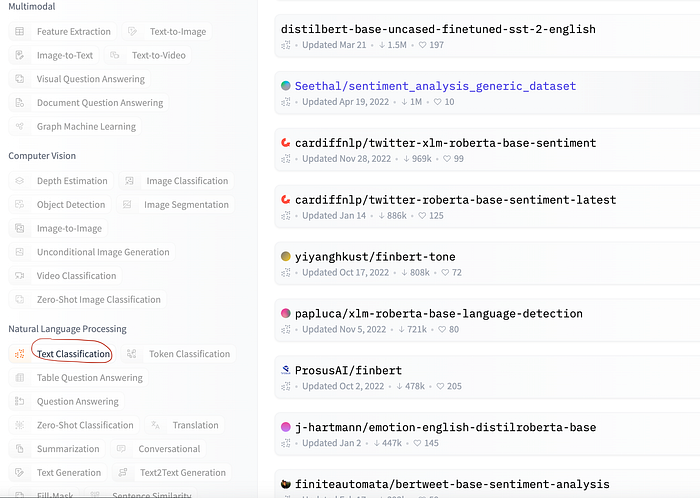
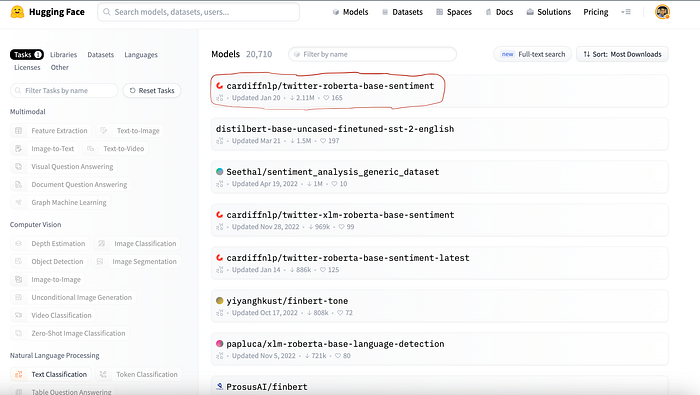
I now choose a model I am interested in from a list of models, there are so many of them!
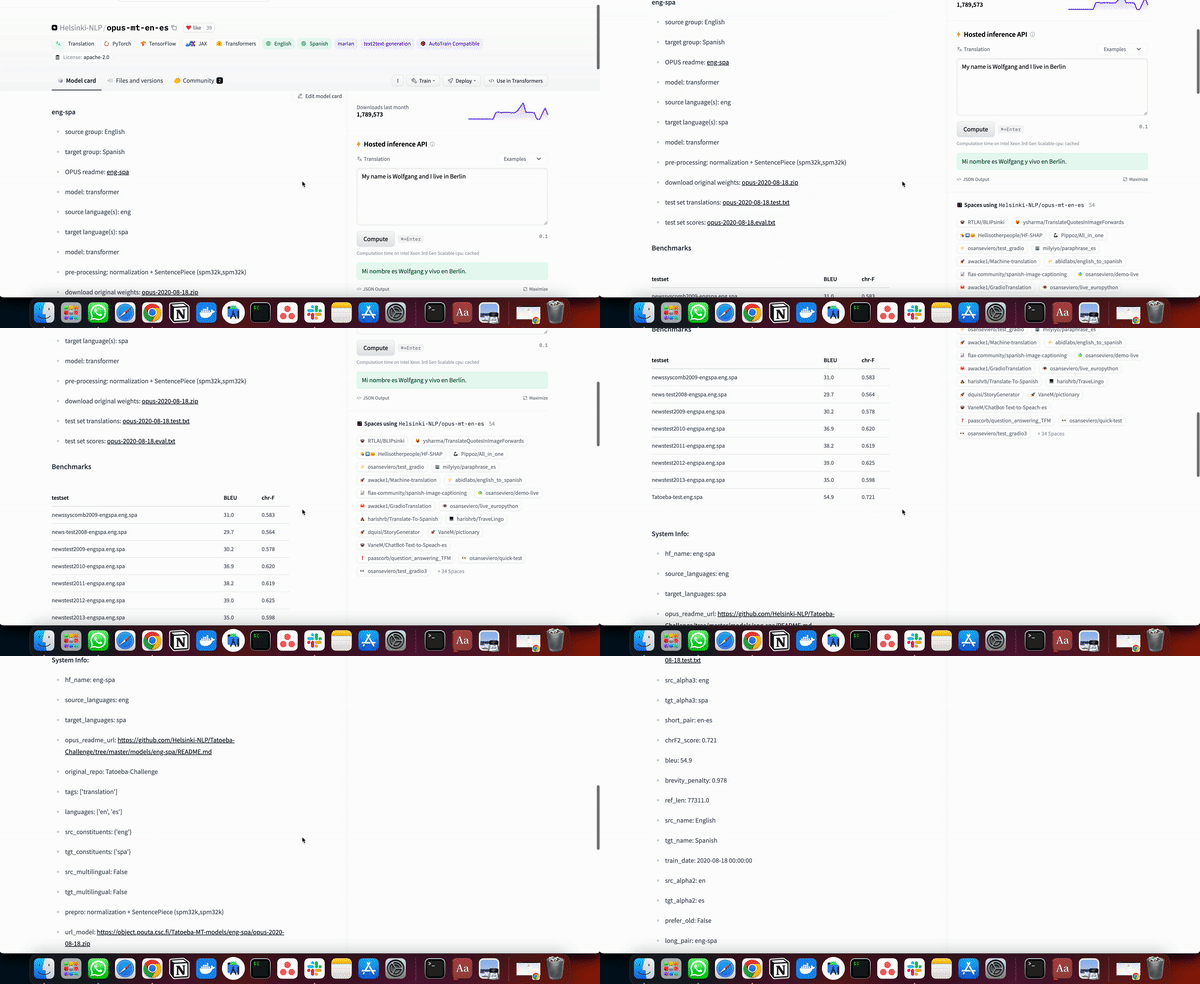
A model is always accompanied by a model card, which has sometimes is more or less detailed about the characteristics of the model and how it was trained etc..
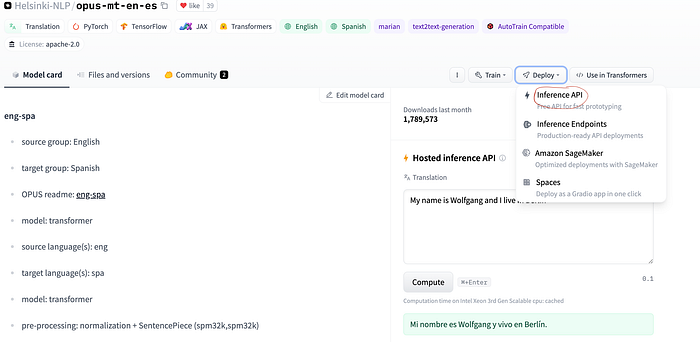
If you click on the deploy button in the upper right-hand corner, a drop-down menu will appear, where you can select the Inference API item.
Inference API will open a window for you where it will explain step by step how to use the model in inference. These APIs are very useful because they allow you to create prototypes if you are working on AI-based projects very quickly.
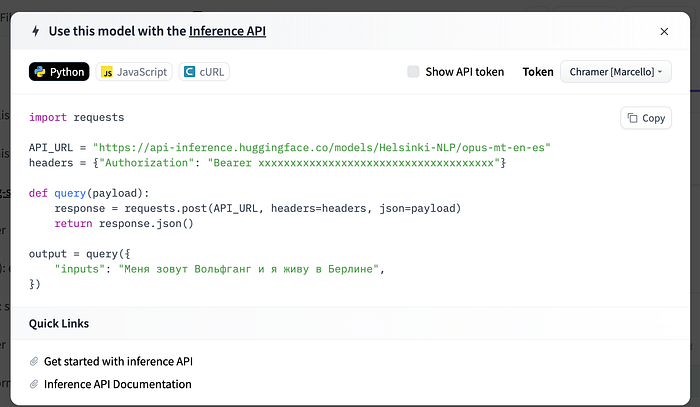
So let’s try now to follow the directions in this window and run the code.
import requests

API_URL = "https://api-inference.huggingface.co/models/cardiffnlp/twitter-roberta-base-sentiment"
headers = {"Authorization": "Bearer API_TOKEN"}

def query(payload):
 response = requests.post(API_URL, headers=headers, json=payload)
 return response.json()

output = query({
 "inputs": "Hey, dude! You're great!",
})

#OUTPUT
'''
[[{'label': 'LABEL_0', 'score': 0.002866477705538273},
  {'label': 'LABEL_1', 'score': 0.018881773576140404},
  {'label': 'LABEL_2', 'score': 0.9782518148422241}]]
'''
As you can see by trying it, we get a result that is a score of whether the sentence is negative, neutral, or positive.
Let’s look at another example with another model now. I would like to use a Question Answering model now, where we feed the model the context and a question, and the model will be able to answer the question by reading the context. First, we select the model.
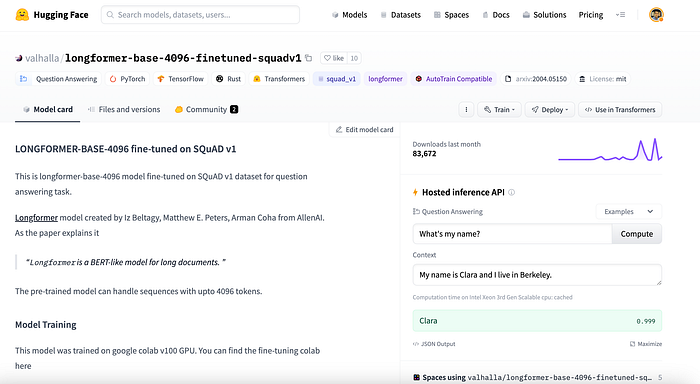
We now use the Inference API.
import requests

API_URL = "https://api-inference.huggingface.co/models/valhalla/longformer-base-4096-finetuned-squadv1"
headers = {"Authorization": "Bearer XXXXXXXXXXXXXXXXXX"}

def query(payload):
 response = requests.post(API_URL, headers=headers, json=payload)
 return response.json()

output = query({
 "inputs": {
  "question": "What's my name?",
  "context": "My name is Marcello and I am an AI specialist. I love pizza and I am Italian."
 },
})

# OUTPUT
#{'score': 0.9990959763526917, 'start': 11, 'end': 19, 'answer': 'Marcello'}
Let us now try a summarization model. So as the name already suggests, the model will return the summary of a given text.
import requests

API_URL = "https://api-inference.huggingface.co/models/facebook/bart-large-cnn"
headers = {"Authorization": "Bearer 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"}

def query(payload):
 response = requests.post(API_URL, headers=headers, json=payload)
 return response.json()

output = query({
 "inputs": "The tower is 324 metres (1,063 ft) tall, about the same height as an 81-storey building, and the tallest structure in Paris. Its base is square, measuring 125 metres (410 ft) on each side. During its construction, the Eiffel Tower surpassed the Washington Monument to become the tallest man-made structure in the world, a title it held for 41 years until the Chrysler Building in New York City was finished in 1930. It was the first structure to reach a height of 300 metres. Due to the addition of a broadcasting aerial at the top of the tower in 1957, it is now taller than the Chrysler Building by 5.2 metres (17 ft). Excluding transmitters, the Eiffel Tower is the second tallest free-standing structure in France after the Millau Viaduct.",
})
Output: The tower is 324 metres (1,063 ft) tall, about the same height as an 81-storey building. Its base is square, measuring 125 metres (410 ft) on each side. During its construction, the Eiffel Tower surpassed the Washington Monument to become the tallest man-made structure in the world.
Final Thoughts
In these examples, I used mainly NLP models, which therefore work on language. HuggingFace to date provides models for all kinds of problems, from computer vision to reinforcement learning.
Hugging Face’s Inference API if used well can be a very useful tool. Think for example if you are a startup, are working in Agile methodology, and need to create a prototype a fast way, to start collecting feedback on your product or to have a first MVP. The Inference API enables fast prototyping and will allow you to create an MVP in no time!
Follow me if you want to read more articles like this! :)
The End
Marcello Politi
Check the article also here